InstaDoodle Review: Can an AI Really Turn Plain Text Into a Whiteboard Video?
- specoo
- September 1, 2026
- Affiliate Marketing, AI
Whiteboard animation has always sat in an odd corner of the video world. It’s the format everyone recognizes — the hand sketching out a lightbulb, a rocket, a stack of coins, while a script explains a product or an idea — but almost nobody wants to make one themselves, because traditional doodle software eats hours and traditional animators charge by the minute. InstaDoodle is the latest attempt to close that gap with artificial intelligence, and it’s worth a straight, unhurried look at what it actually does, what it costs, and where it falls short.
This article breaks down InstaDoodle’s features, pricing structure, real-world use cases, and how it stacks up against older tools like Doodly and Powtoon. It’s written in an editorial voice, not a sales script, so the weaker points get the same attention as the strong ones.
What Exactly Is InstaDoodle?
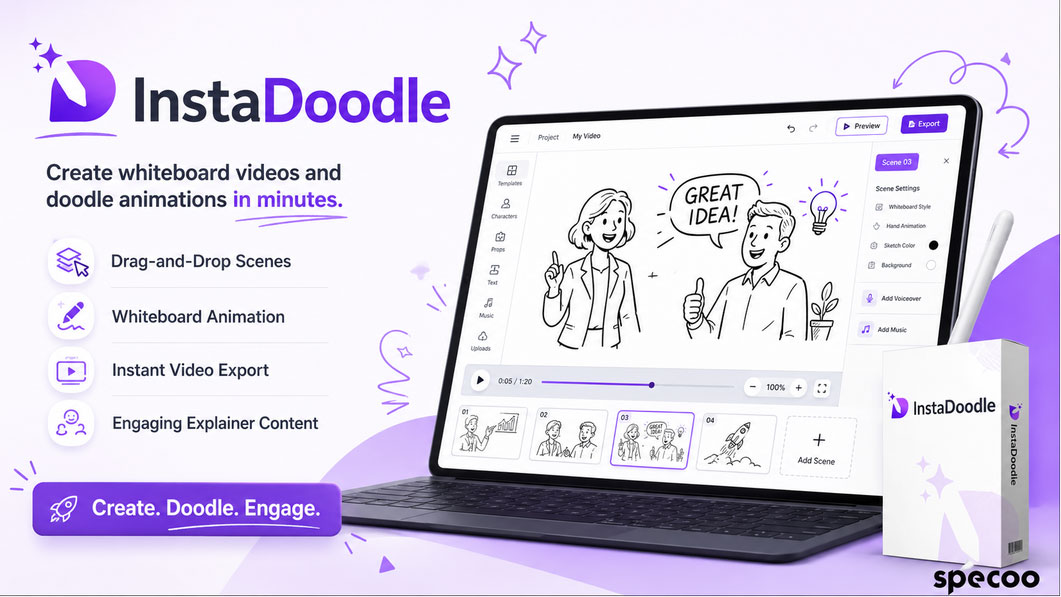
InstaDoodle is a cloud-based, AI-powered whiteboard and doodle-style video creation platform. Instead of hand-drawing every scene or hiring an animator, a user types a description of what they want, and the software’s AI engine generates doodle-style images, characters, and props to match. Those assets get arranged into a timeline, layered with a hand-drawing effect, and rendered into a finished video — no downloads, no design background, and no animation experience required.
The platform runs entirely in the browser. There’s nothing to install, and a project can be started on a laptop and finished later on a tablet, since everything is stored in the cloud rather than on a local machine.
It’s sold through ClickBank, the affiliate marketplace that has hosted digital marketing software for two decades, which means the transaction, refund process, and customer protections all run through ClickBank’s standard system rather than a custom checkout.
The Team Behind the Doodle
InstaDoodle comes from Vlad Christian and Stoica, two Romania-based developers who co-founded Blaster Suite, a company with a long track record in the video-marketing software niche. Their earlier releases include Video Marketing Blaster, Live Event Blaster, Video Spin Blaster, Videly, Dictelo, Speechelo, Thumbnail Blaster, and Scriptelo — a catalog that mostly targets marketers who need faster, cheaper ways to produce video and audio content without hiring a production team.
That history matters for one practical reason: this isn’t a first-time vendor testing an idea. It’s a team that has already shipped, supported, and updated several similar tools, which tends to correlate with steadier long-term maintenance than a brand-new, unproven seller.
Inside the DoodleAI Engine: Core Features
AI Text-to-Video Generation
The centerpiece of InstaDoodle is its DoodleAI engine. A user types a plain-language description of a scene, and the AI produces a matching doodle-style illustration — a character, an object, a background — without requiring any drawing skill. Each generated image draws from the account’s AI credit balance, and generating multiple variations of the same prompt uses one credit per image.
A Substantial Doodle Library
Beyond AI generation, InstaDoodle ships with a built-in library of roughly a thousand pre-made doodle assets covering characters, objects, and backgrounds, along with several different hand styles for the drawing effect itself. That library alone covers a lot of ground for anyone who doesn’t want to burn AI credits on every single scene.
Image-to-Doodle Conversion
Users can upload their own images — a product photo, a logo, a screenshot — and the software will convert it into a doodle-sketch-style video asset. On the entry-level plan, there’s a cap on how much detail (measured in path complexity) a single converted image can carry, which is worth knowing before uploading anything highly detailed.
The AI Wizard (Add-On)
For anyone who doesn’t want to build scenes manually, the optional AI Wizard takes a topic or an existing script, splits it into slides automatically, writes a matching script if needed, generates a synced AI voiceover, and assembles a rough cut without manual editing. This isn’t part of the core purchase — it’s a separate upgrade, covered in the pricing section below.
Cloud Rendering
All rendering happens on InstaDoodle’s servers rather than the user’s own computer, so video quality isn’t limited by local hardware. This is fairly standard for cloud SaaS tools, but it’s still a real convenience for anyone working from an older laptop.
Drag-and-Drop Editing
The timeline editor uses a drag-and-drop interface for arranging scenes, adjusting timing, and layering in background music or voiceovers. There’s no coding, keyframing, or traditional animation software involved.
Lifetime Access, One-Time Payment
The core purchase is a one-time fee rather than a recurring subscription, which is one of the more genuinely attractive parts of the offer compared to most modern video tools — though, as covered below, the AI credit system does carry its own ongoing cost if a user runs out.
How InstaDoodle Actually Works, Step by Step
- Log in and start a project. Users choose between Manual Mode, where every scene is built by hand, or the AI Wizard, if that upgrade has been purchased.
- Pick a starting point. Manual Mode offers either a blank canvas or a template from the built-in gallery, organized by scene type.
- Fill each scene with assets. For every slide, the user either pulls from the doodle library, generates a new AI image from a text prompt, or uploads and converts their own image.
- Choose the drawing animation. Each element can be set to appear via a hand-drawing effect, a wipe, a slide, a pop, or a fade.
- Add voice and music. Voiceovers can be uploaded from an external source, or generated through the AI Wizard upgrade, which currently supports more than 40 languages.
- Render and export. Once the timeline is finished, the video renders in the cloud and becomes available for download or direct publishing.
Who Actually Uses a Tool Like This?
Marketing and Advertising
Doodle-style videos are a common format for social ads and product explainers because the hand-drawn look tends to hold attention longer than static graphics, and it can break down a feature list or a value proposition into something more digestible than a wall of text.
Education and Training
Teachers and course creators use whiteboard animation to simplify dense material — a science concept, a historical timeline, a multi-step process — into a format that’s easier to follow and, based on general engagement research in edtech, easier to retain than plain narration alone.
Content Creation
YouTubers and podcasters use doodle segments to illustrate a point mid-video, or to build entire explainer-style channels around the format, since it doesn’t require appearing on camera.
Business and Internal Communication
Pitch decks, onboarding videos, and internal training material all benefit from the same simplification effect — turning a dense policy document or product roadmap into something a new hire can actually sit through.
Nonprofits and Advocacy
Doodle videos are a low-cost way for smaller organizations to explain their mission or a cause without commissioning a full animation studio, which matters when the production budget is close to zero.
Personal Projects
Some buyers simply use it for personal creative projects — birthday videos, personalized explainers, or just experimenting with a visual style they otherwise couldn’t produce by hand.
What InstaDoodle Costs: The Full Pricing Breakdown
This is the part most reviews gloss over, and it’s the part that actually determines whether the deal is good.
| Item | Price | What’s Included |
|---|---|---|
| Front-End (Main Offer) | $37 one-time | Lifetime access, unlimited video projects, 150 non-expiring AI credits, standard doodle library, horizontal video export |
| Upsell 1: Pro Version | $97 one-time | 3,000+ extra doodle elements, 2K/4K export, 8 additional hand-drawing styles, bonus training and templates |
| Upsell 2: AI Wizard | $67 one-time | Automated scriptwriting, AI voiceovers in 40+ languages, automatic scene syncing |
| AI Credits (ongoing, optional) | $37/month or $47/month | 1,000 monthly credits, or unlimited monthly credits, for generating new AI doodle images |
A few things are worth being blunt about:
- The $37 front-end price gets a real, usable product — unlimited video creation and 150 AI credits — not a stripped demo.
- The AI credits included with the main purchase do not expire, but they also don’t refresh. Once they’re used, generating more AI images requires a monthly credit subscription. This is the one place where “one-time payment” doesn’t tell the whole story, and it’s the most common source of buyer frustration in independent reviews.
- The core doodle library and manual editing tools work without ever touching AI credits, so a budget-conscious user can still produce unlimited videos using only the built-in assets.
- Horizontal video only — there’s currently no option to export vertical or square formats for platforms like TikTok or Instagram Reels.
- Text length per scene is capped at 3,000 characters, which is generous for most explainer scripts but worth knowing for anyone planning long-form narration.
The Honest Pros and Cons
What holds up:
- A genuinely low one-time entry price compared to subscription-based competitors
- No cap on the number of videos or projects
- A real AI engine, not just a rebadged stock library
- No design or animation experience required
- Backed by a 30-day, no-questions-asked ClickBank refund policy
What doesn’t:
- AI credits run out and don’t auto-refill without a paid subscription
- No vertical or square export options
- No built-in integration with premium voice engines like ElevenLabs — external voice tracks have to be uploaded manually
- The full experience (scripting, voiceover, auto-syncing) is locked behind two separate upsells rather than included upfront
InstaDoodle vs. the Established Competition
| Tool | Pricing Model | AI Generation | Notable Limitation |
|---|---|---|---|
| InstaDoodle | One-time, $37+ | Yes (DoodleAI engine) | Horizontal video only |
| Doodly | One-time (higher entry price) | No | Larger manual asset library, but no AI scene generation |
| Powtoon | Subscription | Limited | Built for enterprise teams; steeper monthly cost |
| Vyond | Subscription | Limited | Strong production quality, but priced for agencies and larger teams |
| DoodleMaker | One-time | Yes | Broader style range (not limited to whiteboard), similar upsell structure |
The short version: InstaDoodle competes well on price and on being genuinely AI-driven rather than just template-driven. Doodly still wins on raw asset variety and format flexibility. Powtoon and Vyond both aim at a more corporate buyer who’s fine paying monthly for polish and a broader animation toolkit beyond doodle-style content.
Who Should — and Shouldn’t — Buy This
It’s a reasonable fit for solo marketers, course creators, small business owners, and content creators who need a steady stream of whiteboard-style videos without hiring an animator or committing to a $30–$100 monthly subscription elsewhere.
It’s a weaker fit for anyone who specifically needs vertical video for Reels or TikTok, anyone who wants a fully “set it and forget it” unlimited AI generation experience without ever touching a monthly add-on, or anyone whose brand style goes beyond the whiteboard/doodle aesthetic entirely.
Frequently Asked Questions
Is InstaDoodle a monthly subscription?
No. The core software is a one-time payment with lifetime access. The only recurring cost is optional, and it only applies if a user wants more AI-generated images after using up the included 150 credits.
Do the AI credits expire?
The 150 credits included with the main purchase don’t expire and have no time limit, but they also don’t refresh automatically. Once they’re gone, generating new AI images requires either a $37/month plan for 1,000 credits or a $47/month plan for unlimited credits.
Can I create unlimited videos with just the $37 purchase?
Yes. The video and project count is unlimited on the front-end plan. The AI credit limitation only affects how many new AI-generated doodle images can be produced — not how many finished videos can be made.
Does InstaDoodle support vertical video for TikTok or Reels?
Not currently. Exports are horizontal-format only, which is a real limitation for anyone building primarily for short-form vertical platforms.
Is there a free trial?
There isn’t a free trial. Instead, purchases are covered by a 30-day money-back guarantee processed through ClickBank, so the risk is limited to a short refund window rather than an ongoing commitment.
How is InstaDoodle different from Doodly or DoodleMaker?
The main difference is the AI generation layer. Doodly relies entirely on a manual, pre-built asset library with no AI image generation. DoodleMaker also includes AI tools and a broader style range beyond whiteboard doodles, but follows a similar one-time-plus-upsells pricing structure.
Final Verdict
InstaDoodle is a legitimate, actively supported tool that does what its core pitch claims: it turns a text description into a whiteboard-style doodle video without requiring any design skill, and it does so for a one-time fee that undercuts most subscription-based alternatives. The AI credit system is the one part of the deal that deserves a second look before buying, since it’s the difference between “unlimited forever” and “unlimited until the free credits run out.” For anyone whose video needs stay within horizontal formats and who’s comfortable with an optional monthly add-on down the road, it’s a reasonable, low-risk way to add doodle-style video to a marketing or content toolkit.
The official product page, current pricing, and the 30-day refund terms can be found here: Get InstaDoodle
Affiliate Disclosure and Company Information
This article contains an affiliate link. If a purchase is made through the link above, the author may receive a commission at no additional cost to the buyer. That relationship has no bearing on the pros, cons, and limitations described in this review.
InstaDoodle is sold and processed through ClickBank (operated by Click Sales, Inc.), whose registered address is 1444 S. Entertainment Ave., Suite 410, Boise, ID 83709, USA. Product support for InstaDoodle can be reached at support@instadoodle.com. Refund requests fall under ClickBank’s standard 30-day money-back policy, and as with any digital purchase, buyers should read the current terms on the official order page before completing checkout.
Related Posts